
Understanding PAYE and Employer’s National Insurance
Taking on your first employee is a big move forward.
It means your business is growing. But it also means you’ll have some new taxes to handle. Once you’ve got the basics sorted, it should all make sense.
Let’s see what needs to be done, step by step.
A bit of background first
When you pay someone who works for you, it’s not just a matter of handing over their wages. Before you pay them, you also need to take some money from their wages and send it to us.
This is called running a payroll and it makes sure that anyone who works for you is paying us the right amount of Income Tax and National Insurance.
You pay National Insurance in what’s called ‘contributions’. As an employer, you’ll also need to make these yourself.
We’ll collect tax through PAYE
We collect Income Tax and National Insurance through a system called ‘Pay As You Earn’ (or PAYE for short).
When you’re an employer, we’ll send you something called a ‘tax code’ for each of your employees, so you know how much Income Tax to take from their wages. You can learn more about how this works on our Understanding your tax code page.
The PAYE system will also work out what National Insurance contributions you need to take. You can find out more about National Insurance on GOV.UK.
You then send the money you’ve collected to us, including your Employer’s National Insurance contributions, while your employee keeps the rest.
When to register with us for PAYE
You’ll need to register with us as an employer if any of the following things apply:
- an employee earns £96 or more a week
- they get expenses or benefits from you, like a company car
- they already have another job
- they’re getting a pension from you
You can find out more about what to do if you give expenses and benefits to your employees on GOV.UK.
Key thing to remember:
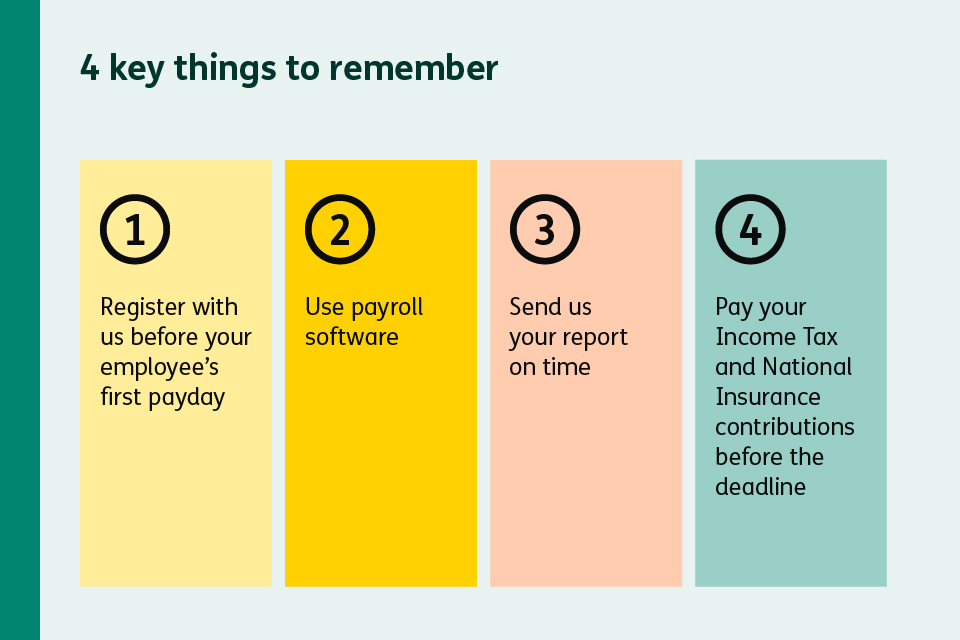
You can register as an employer on GOV.UK. You need to do this before your employee’s first payday – and it can take up to 10 days to process.
Once you’ve registered with us as an employer, you can use PAYE Online on GOV.UK to stay on top of things. It lets you:
Check what Income Tax you owe
Check if you need to pay any Employer’s National Insurance
View your payment history
See tax codes for your employees
Get alerts if you’ve missed a deadline
Using payroll software to work the numbers
Most employers use payroll software to work out exactly how much Income Tax and National Insurance to take from their employees’ wages. The software uses the tax codes we give you to do the sums for you.
Helpful tip:
If your business has under 10 workers, you can get free Basic PAYE tools from us on GOV.UK. If you have a bigger company or want further support, there are plenty of paid software tools available out there too.
If you’re worried about handling a payroll, you could also pay an accountant or payroll company to do everything for you.
When and how to pay us
You’ll need to pay your PAYE bill by the 22nd of the month, after the last tax month ends.
Here’s what that means.
Tax months run from the 6th to the 5th of each month. For any wages you pay between 6 April and 5 May, you’d need to pay your PAYE bill to us by 22 May.
The money you send us will be the Income Tax and National Insurance you’ve collected from your employees and your Employer’s National Insurance. We’ll explain more about that later.
Key thing to remember:
If you think that you’ll owe us less than £1,500 a month, you can ask us to let you pay once every 3 months instead of monthly.
You can pay by Direct Debit, online banking, or through your business tax account. Direct Debit is often the easiest as we can collect what you owe automatically.
Sending us a report with every payroll
Each time you pay your employees, you need to send us a report. This is called Real Time Information, or RTI for short. Don’t worry, your payroll software will do this for you.
The main report is called a Full Payment Submission (FPS). It’s a bit of a mouthful, but it simply tells us what you’ve paid each employee and how much money you’ve taken in Income Tax and National Insurance contributions.
You need to send this report to us on or before each payday.
You pay Employer’s National Insurance too
You don’t just have to take tax and National Insurance contributions from your workers’ pay. Your business also needs to pay Employer’s National Insurance, on top of what you pay them. It’s something that can catch new employers out, so you need to budget for it.
The current rate for Employer’s National Insurance is 15%. You pay this on any employee’s earnings above £96 a week (or £5,000 a year).
Here’s how that works
You pay an employee £500 a week. On the first £96, you don’t need to pay any National Insurance. But you pay 15% on the remaining amount of £404. This means you pay £60.60 a week in Employer’s National Insurance for that employee.

Key thing to remember:
This money comes out of your business, not your worker’s pay packet, so it won’t show up on their payslip. However, you’ll still need to pay it to us along with the Income Tax and National Insurance contributions you’ve taken from their wages.
There’s an Employment Allowance available
You may be able to get help with the cost of Employer’s National Insurance. Regardless of the size of your company, you may be able to claim up to £10,500 off through something called the Employment Allowance.
You can claim this allowance directly through your payroll software. We then take the allowance off your Employer’s National Insurance until it’s all used up, or the tax year ends.
You can’t claim it if you’re a limited company with just one director and no other employees earning above £5,000, or if you’re a public authority which isn’t a charity.
Getting it right from day one
Running a payroll might seem like a lot when you’re new to it. But once you’ve got it set up, you’ll soon be in the swing of things. Most payroll software will guide you through each step.
You’ve taken on more people because your business is doing well. Now you’ve got the basics of PAYE and Employer’s National Insurance sorted, you can get back to what you do best – running your business.
You can find out more about getting ready to employ someone for the first time at GOV.UK.